# Typst for TTRPG's
**URL:** https://discourse.rpgcauldron.com/t/typst-for-ttrpgs/1640
**Category:** Making
**Tags:** tools
**Created:** [January 14, 2025, 10:27pm UTC](https://discourse.rpgcauldron.com/t/typst-for-ttrpgs/1640 "2025-01-14T22:27:13Z")
**Posts on this page:** 11
**Page:** 1
### Author:  [@WindowDump](https://discourse.rpgcauldron.com/u/WindowDump)
#### Post date: [January 14, 2025, 10:27pm UTC](https://discourse.rpgcauldron.com/t/typst-for-ttrpgs/1640/1 "2025-01-14T22:27:13Z")
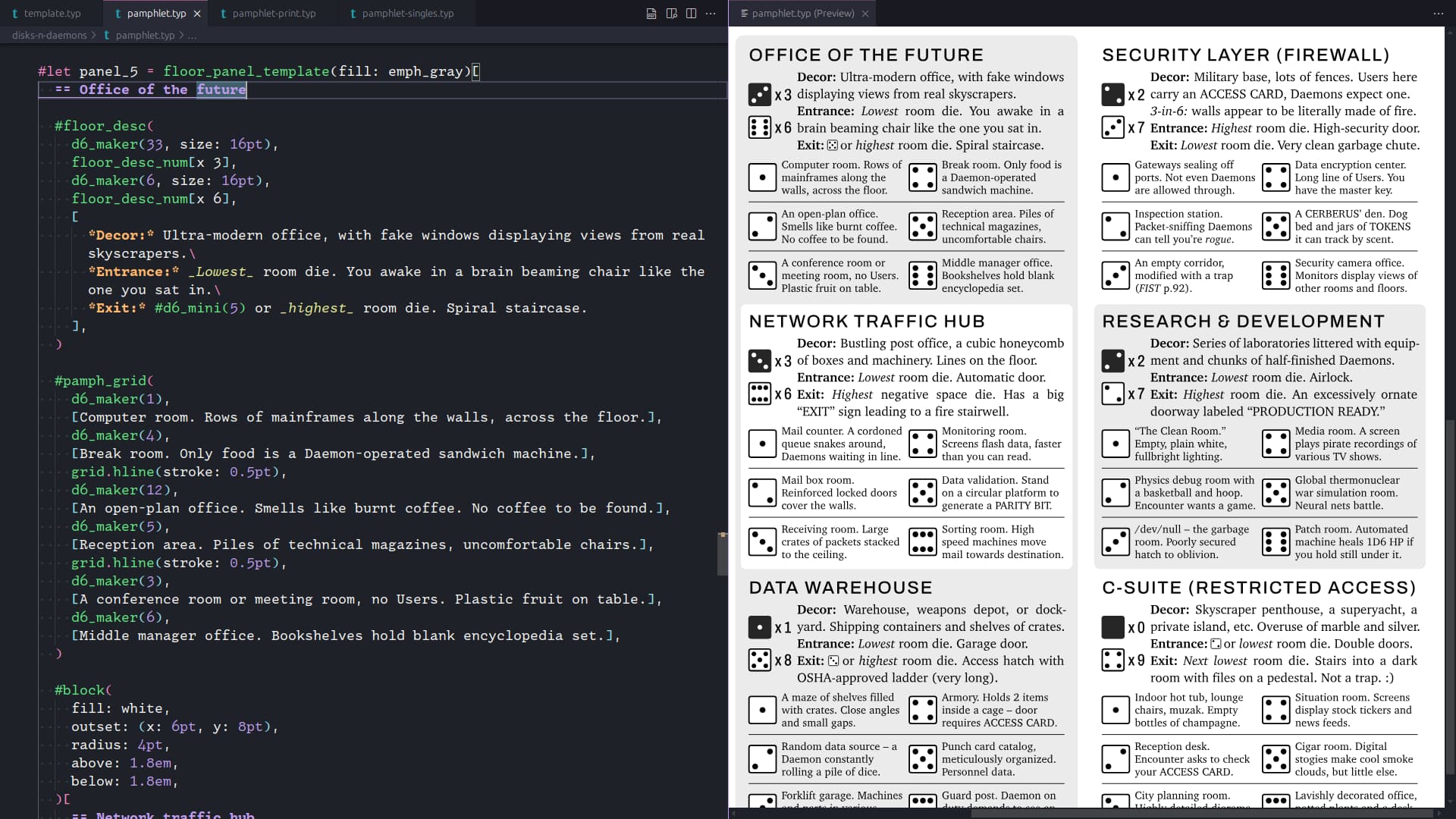
[Typst](https://typst.app) is a markup-based typesetting system with a familiar syntax, powerful features, and fast performance. You can create documents in a few minutes with reasonable defaults, or dive in deep and render hundreds of pages in seconds. I’ve found it to be a lot more approachable than LaTeX and much more flexible than a WYSIWYG editor like Word or Google Docs. My setup uses the runtime and live preview feature locally, without having to worry about an internet connection or subscription fee. The runtime is relatively small (about 25 MB uncompressed) and supports the fonts you already have installed. I’d like to share some of the cool tricks I’ve discovered so you can get right to the fun parts.
# Installation
First, have the Typst CLI available on your system. It’s available in many package managers as `typst`, or you can manually set it up. [See GitHub for more instructions.](https://github.com/typst/typst?tab=readme-ov-file#installation) You’ll also need a text editor.
The simplest workflow is to create a source file like `file.typ`, invoke `typst watch file.typ`, then open the source file in your text editor and the output PDF `file.pdf` in a PDF viewer. Saving the source file will cause Typst to recompile the PDF, and your viewer should automatically reload the PDF. Type some stuff, save the file, and see the results. Check the terminal output if nothing happens, there might be a syntax error.
For local live previews, I recommend using the [Tinymist language server](https://myriad-dreamin.github.io/tinymist/) with one of its supported editors like [VSCodium](https://vscodium.com). It provides syntax and error highlighting (really nice), preview navigation (click on an element to go to its location in the source), and optional PDF output on file save. If you already use VSCodium, it’s painless to install and start hacking.
Android 9+ users can try [BeauTyXT](https://beautyxt.app), an editor with a live Typst preview feature.
You can also try the [online Typst editor](https://typst.app/pricing/), which has a built-in preview feature and supports multiple users editing a doc at once. This requires an internet connection and an account.
# Getting started
Once you’re rendering PDF’s, the [Typst tutorial](https://typst.app/docs/tutorial/) is a great high-level overview. Keep the [reference section](https://typst.app/docs/reference/) of the docs handy.
More practical applications and examples are available in the [Typst Examples Book](https://sitandr.github.io/typst-examples-book/book/about.html).
# Examples & going deeper
What made Typst click for me was learning the difference between “content mode” and “scripting mode”. By default, you’re in content mode, which has a Markdown-like syntax. The biggest difference is using `=` for headings instead of `#`. To enter scripting mode, type `#` and write whatever script you want, like a function call, show rule, definition, etc. Inside scripting mode, you can move back to content mode with `[]` hard brackets - everything inside those is treated as content, so you get headers, lists, etc. The tutorial covers this, but I needed to keep reminding myself of it until it felt natural.
You can find packages with advanced features at the [Typst Universe](https://typst.app/universe/). The Typst Discord has a Showcase channel with many cool projects.
## Sample projects
- [My typst-ttrpg GitHub repo](https://github.com/WindowDump/typst-ttrpg) - this is not an example of “best practices”, these are barely cleaned up hacks.
- [Runic Magic](https://github.com/WindowDump/typst-ttrpg/blob/main/runic-magic.typ) - example of how to make an array, then use the spread syntax to create a chart from it.
- [Disks & Daemons](https://github.com/WindowDump/typst-ttrpg/blob/main/disks-n-daemons/pamphlet.typ) - trifold pamphlet with a dungeon generator and dungeon procedures crammed into it. Screen, print, and singles versions rendered from a single source file, also a D6 generator function.
- [Longshot City character sheet & quick reference](https://github.com/WindowDump/typst-ttrpg/blob/main/longshot-city.typ) - uses spreading to easily make several copies of stat blocks, also pretty tables.
- [FIST Handbook](https://github.com/WindowDump/typst-ttrpg/blob/main/fist-handbook.typ) - pamphlet with a character sheet, creation rules, and rules summary.
- [WoDu Remix character sheet](https://github.com/WindowDump/typst-ttrpg/blob/main/wodu-remix-sheet-halfletter.typ) - an experimentation in layering, needs cleanup (made before I figured out the spread syntax).
- [The Littlest Brown Book](https://idraluna-archives.bearblog.dev/the-littlest-brown-book-a-0e-retroclone/) - A compact OD&D retroclone inspired by [Fantastic Medieval Campaigns](https://traversefantasy.itch.io/fmc). Source available, plus [a modding guide](https://idraluna-archives.bearblog.dev/the-littlest-brown-book-typst-modding-guide/)!
- [WoDu Remix Ability Cards by Skander](https://typst.app/project/r9cKcOm5A6BNjQ9sJg1mzl) - an example of separating content and formatting.
- [Vecchia Scuola GDR](https://xoxarle.itch.io/vecchia-scuola) - OSR fantasy game (in Italian) with source available.
- [The Demon of Dogwater Gulch](https://gordianblade.itch.io/the-demon-of-dogwater-gulch) - Lancer one-shot module written in Typst, layout inspired by the [Classic Explorer Template](https://www.explorersdesign.com/classic-explorer-template/).
## Blogs
- [Idraluna Archives - Trying Typst for TTRPGs](https://idraluna-archives.bearblog.dev/trying-typst-for-ttrpgs/)
- [Gordian Blade - First Impressions of Typst, a Promising New Layout Tool](https://gordianblade.com/first-impressions-of-typst-a-promising-new-layout-tool/)
- [Irdraluna Archives - The Littlest Brown Book, a 0e Retroclone](https://idraluna-archives.bearblog.dev/the-littlest-brown-book-a-0e-retroclone/) and [TLstBB Modding Guide](https://idraluna-archives.bearblog.dev/the-littlest-brown-book-typst-modding-guide/)
# Caveats and missing features
- No support for variable fonts yet - you’ll need to use static versions.
- Very limited support for wrapping text around floating objects or figures, especially non-rectangular ones.
- No clipping masks, limited transparency effects.
- Gradients can be _very big_ and slow to render.
- Columns of text are not auto-balanced.
- Tinymist live preview navigation breaks if you turn on clipping or use a gradient as a fill.
- [HTML export support in development.](https://github.com/typst/typst/issues/5512)
# What’s next?
I’d like to get into more depth about creating graphs and charts, especially those used in games around here (i.e., hex flower charts, D66 tables, etc.). I’ll post pretty pictures later.
Have you played around with Typst? Show off your projects and experiments! You can ask questions here or consult [the Typst Community](https://typst.app/docs/community/) for answers and more inspiration.
---
### Author:  [@dodgepong](https://discourse.rpgcauldron.com/u/dodgepong)
#### Post date: [January 14, 2025, 10:38pm UTC](https://discourse.rpgcauldron.com/t/typst-for-ttrpgs/1640/2 "2025-01-14T22:38:58Z")
Thanks for kicking off this discussion! I’ve really been enjoying Typst (I made [The Demon of Dogwater Gulch](https://gordianblade.itch.io/the-demon-of-dogwater-gulch) as Window Dump linked). I also blogged about Typst a few months ago in the lead-up to writing that module: [First Impressions of Typst, a Promising New Layout Tool](https://gordianblade.com/first-impressions-of-typst-a-promising-new-layout-tool/) (includes some links to sample repos of stuff I’ve made). I also used Typst to make foldable printable standees for my Lancer games – spacing and sizing was really easy.
Overall I’ve been super impressed with it and plan to continue using it in the future. Being able to commit changes to a Git repository is awesome.
It’s not for everyone though. If the idea of writing a module in Markdown isn’t appealing to you, then I’d probably stick with a traditional DTP software like Affinity Publisher.
Stuff I wish Typst properly supported:
- Easier support for laying out in spreads (images that cross across a spread, easier support for alternating right/left page numbers, etc.)
- EPUB output (requires HTML output, as OP linked)
- [Stroke position](https://github.com/typst/typst/issues/4875)
- [Better support for spacing in lists](https://github.com/typst/typst/issues/5510)
---
### Author:  [@elmcat](https://discourse.rpgcauldron.com/u/elmcat)
#### Post date: [January 14, 2025, 10:40pm UTC](https://discourse.rpgcauldron.com/t/typst-for-ttrpgs/1640/3 "2025-01-14T22:40:29Z")
I have played around with Typst. It’s a lot of fun. It is of course not on par with the more sophisticated layout tools (yet?), but it is surprising how much you can already do.
If you like CSS, LaTeX, or a little bit of coding you should definitely check it out. The post here has everything to get you started, thanks @WindowDump !
---
### Author:  [@WindowDump](https://discourse.rpgcauldron.com/u/WindowDump)
#### Post date: [January 15, 2025, 4:22pm UTC](https://discourse.rpgcauldron.com/t/typst-for-ttrpgs/1640/4 "2025-01-15T16:22:59Z")
> [@dodgepong](#):
>
> I also blogged about Typst a few months ago in the lead-up to writing that module: [First Impressions of Typst, a Promising New Layout Tool](https://gordianblade.com/first-impressions-of-typst-a-promising-new-layout-tool/) (includes some links to sample repos of stuff I’ve made).
Whoops, knew I missed something when I was collecting links! This post inspired me to make a Typst pamphlet, which was a lot of fun.
---
### Author:  [@rolledlow](https://discourse.rpgcauldron.com/u/rolledlow)
#### Post date: [January 24, 2025, 5:05pm UTC](https://discourse.rpgcauldron.com/t/typst-for-ttrpgs/1640/5 "2025-01-24T17:05:00Z")
Ooh, how exciting! A new toy. 🙂
---
### Author:  [@Linus](https://discourse.rpgcauldron.com/u/Linus)
#### Post date: [March 18, 2025, 5:49pm UTC](https://discourse.rpgcauldron.com/t/typst-for-ttrpgs/1640/6 "2025-03-18T17:49:19Z")
There’s been a lot of activity in this [PR](https://github.com/typst/typst/pull/5420) lately. This would at least make progress towards enabling users to embed color profiles in their exported PDFs which is a requirement for print-on-demand services. 🤞
---
### Author:  [@WindowDump](https://discourse.rpgcauldron.com/u/WindowDump)
#### Post date: [April 24, 2025, 3:37pm UTC](https://discourse.rpgcauldron.com/t/typst-for-ttrpgs/1640/7 "2025-04-24T15:37:28Z")
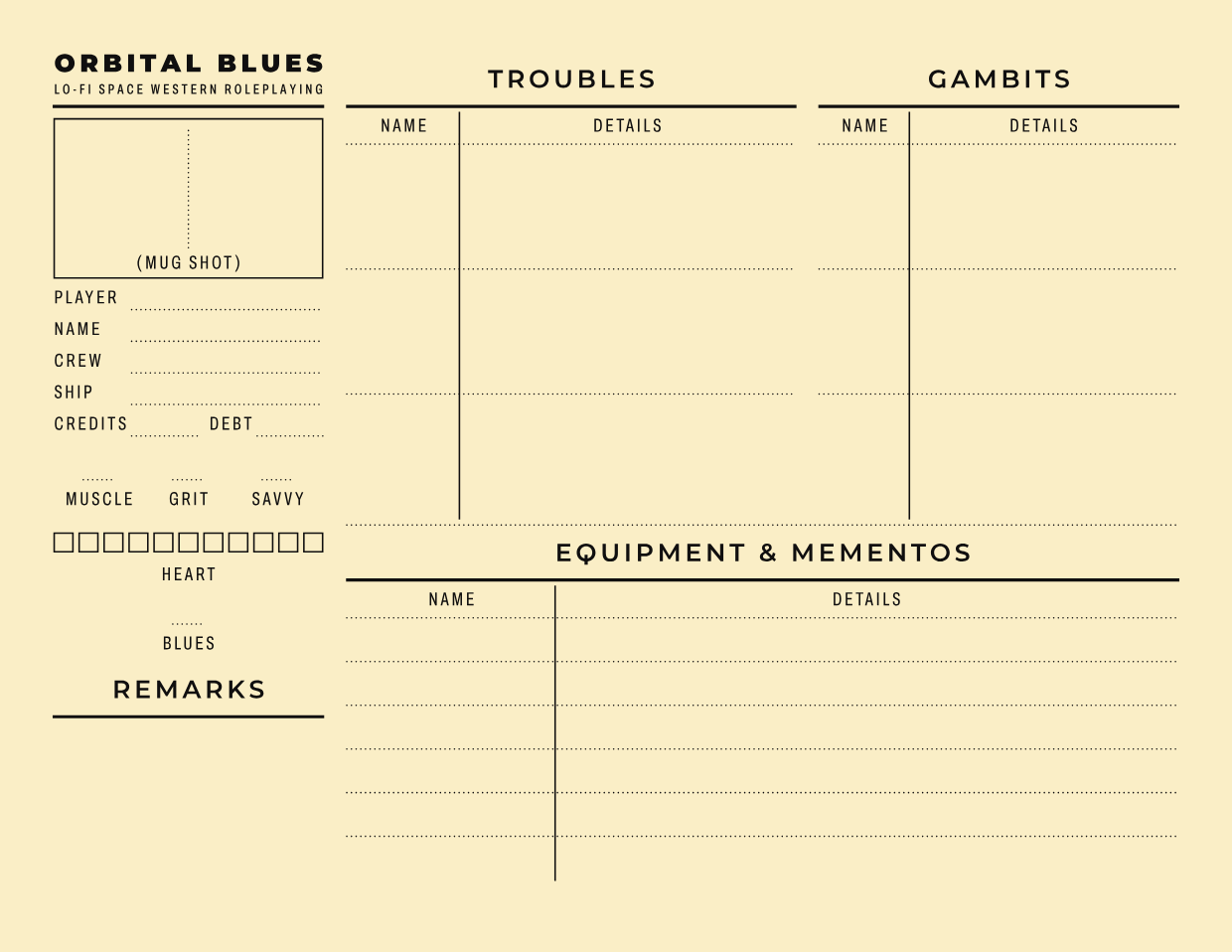
I got inspired by [Orbital Blues](https://soulmuppetpublishing.itch.io/orbital-blues) and its wonderful typography to make a character sheet that I could also use to track my campaign for it. [Character (& ship) sheet template and sample](https://github.com/WindowDump/typst-ttrpg/blob/main/orbital-blues-char.typ) which can be filled in directly in Typst for pregens or on-screen tracking, or filled with placeholder values for a printable version. See the [generated PDF](https://github.com/WindowDump/typst-ttrpg/blob/main/orbital-blues-char.pdf) for an example of a filled in sheet.
Speaking of printer-friendly, in my quest for single source, multiple variations, I dug into the context expression and wrapped my head around it, so the lines on the sheet are the same color as the text. This makes it easy to make a [printer-friendly version](https://github.com/WindowDump/typst-ttrpg/blob/main/orbital-blues-char-print-friendly.typ) that gets the same style and layout tweaks as the pretty color version.
Notable features:
- Characters are Typst dictionaries, pass them to the sheet function to get a sheet. If you pass in content you can click on the preview to go to the same line
- Option for character’s Heart to use table-friendly boxes or screen-friendly text.
- Lines used in the sheet are the same color as the text, with the power of context.
- Page template with set and show rules, and arguments to set page background and text fill colors.
- Wacky hacks to get around Montserrat having every alternate character in the same stylistic set when I only want the Q and G.
Hot Typst tip: the [context statement](https://typst.app/docs/reference/context/) returns _content_, not code, not dictionaries, not arrays, etc. If you need context (ie, to get page.fill or text.fill), wrap the closest content type with it.
---
### Author:  [@WindowDump](https://discourse.rpgcauldron.com/u/WindowDump)
#### Post date: [May 13, 2025, 4:04pm UTC](https://discourse.rpgcauldron.com/t/typst-for-ttrpgs/1640/8 "2025-05-13T16:04:26Z")
I learned about [Two Swords](https://github.com/sean-clayton/two-swords), a dark fantasy expansion for Cairn, from its author on the NSR Cauldron Discord server. Source code is linked - another practical example of how to structure a large project. There’s a few cool tricks in there too, like the [decoration on the note block](https://github.com/sean-clayton/two-swords/blob/main/lib.typ#L140-L167). Storing stat blocks in YAML or TOML is a neat idea, especially if you want to expand the project beyond Typst.
I’m posting discussions of my projects on my blog when I’m not hacking on other projects. There’s notes on source code, layout, and the content.
- [Runic Magic](https://windowdump.github.io/posts/runic-magic/) (includes verbose rules for FIST)
- [Longshot City](https://windowdump.github.io/posts/longshot-city-character-sheet/) character sheet & quick reference
- [Disks & Daemons](https://windowdump.github.io/posts/disks-n-daemons/)
I’m working on another FIST supplement, with art this time. I learned the first trick is making placeholder boxes so you remember you need art.
---
### Author:  [@eeldip](https://discourse.rpgcauldron.com/u/eeldip)
#### Post date: [May 13, 2025, 5:31pm UTC](https://discourse.rpgcauldron.com/t/typst-for-ttrpgs/1640/9 "2025-05-13T17:31:24Z")
love the card catalog look for the character sheet. my favorite detail is how you DIDN’T connect these lines. looks very 50’s space age.
---
### Author:  [@PaulJ](https://discourse.rpgcauldron.com/u/PaulJ)
#### Post date: [October 6, 2025, 3:03pm UTC](https://discourse.rpgcauldron.com/t/typst-for-ttrpgs/1640/10 "2025-10-06T15:03:58Z")
I recently released an adventure for Vaults of Vaarn. I wrote a blog post that detailed my design goals, including a section on how I used Typst to layout the PDF with some actual code used for creating a UI component.
> **[Design Goals for Beneath the Ikor Quag Sinkhole](https://games.semitext.xyz/2025/10/03/Design-Goals-for-Beneath-the-Ikor-Quag-Sinkhole.html)**
>
> As previously mentioned, Beneath the Ikor Quag Sinkhole, is now available for purchase at itch.io. Now that it’s out, I’d like to discuss some of my design goals that drove the work. It’s difficult to discuss a design without getting into spoilers,...
---
### Author:  [@RogerBW](https://discourse.rpgcauldron.com/u/RogerBW)
#### Post date: [December 20, 2025, 1:17pm UTC](https://discourse.rpgcauldron.com/t/typst-for-ttrpgs/1640/11 "2025-12-20T13:17:08Z")
Just found this thread (and indeed this site). I’ve been using Typst for basically everything since I found it earlier this year, including a character manager for _Cthulhu Eternal._ The idea is that you keep the character information in a JSON file, then render it into a character sheet (or a GM cheat sheet) with Typst. [Firedrake/shoggoth: Suporrt software for the Cthulhu Eternal role-playing system. - Codeberg.org](https://codeberg.org/Firedrake/shoggoth/)
I’ve done something similar for Mongoose’s _2300AD_, but since that includes proprietary information I can’t easily publish it.